Free AI keyboard app for Android

The AI Keyboard
for Android
Type faster.
Reply smarter.

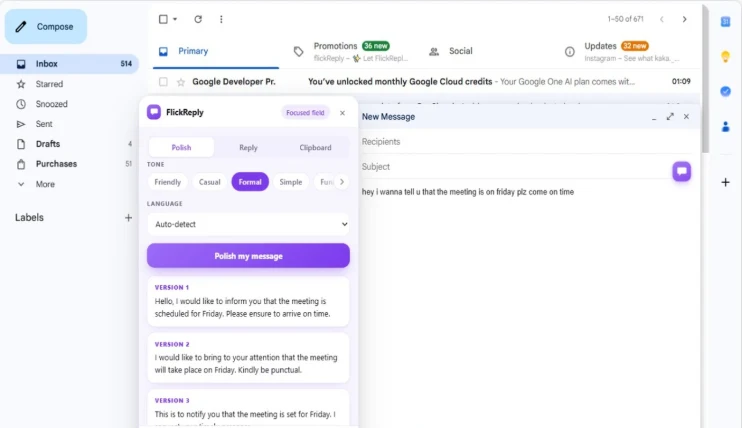
Tap the AI key in WhatsApp, Instagram and LinkedIn, pick a tone, and FlickReply reads the conversation on screen and suggests replies. Or tap polish on a message you wrote and get 3 to 4 corrected versions to choose from, in every app you type in.

Screen recording of the FlickReply AI Keyboard generating a smart reply inside an Android chat app.
Inline AISmart replies and rewrite
Privacy ModeKeeps sessions private
AI Keyboard Features

Everything you expect from a keyboard,
plus AI when you need it.

Most writing tools make you leave the conversation, paste your text somewhere else, then paste it back. FlickReply is a real Android input method, so the reply assistant can read the conversation already on screen and suggest an answer without you retyping any of it. That works in WhatsApp, Instagram and LinkedIn today, with Gmail in development. Polishing a message you wrote yourself works in every app.

Built For Daily Typing

Built for the way you actually type

Every AI action happens inside the keyboard area, in the app you are already using. Nothing opens full screen, nothing steals your place in the thread, and a reply that took two minutes to word now takes seconds.

AI Mode

Smart replies from the chat on screen

Pick a tone, get replies based on the conversation in front of you. In WhatsApp, Instagram and LinkedIn.

Tools

Keyboard tools panel

Clipboard history, emoji, text editing and share tools, one tap away.

Comfort

Sized to your hand

Resize the keyboard, switch to one-handed mode, or float it on screen.

How It Works

How to use the AI keyboard in three steps

01

Install and enable FlickReply

Download the AI keyboard from Google Play, enable FlickReply in your Android keyboard settings, and select it as your input method. Android guides both steps.

02

Type normally in any app

A familiar keyboard layout with emoji, clipboard history, text editing and share tools, working the same way everywhere Android accepts text.

03

Tap AI when you want help

In WhatsApp, Instagram and LinkedIn, tap the AI key, pick a tone, and FlickReply reads the conversation on screen and suggests replies in that tone. Or tap polish on something you wrote yourself, in any app, and pick from 3 to 4 corrected versions. Reply support for Gmail is in development.

Screen recording of the FlickReply AI Keyboard rewriting a message and switching between reply tones.

Watch It Work

Set it up and start using it in about a minute

Two short videos: getting FlickReply enabled on Android, and what tapping the AI key actually does inside a chat. Both open full size.

Setup

How to set FlickReply up

Installing FlickReply from Google Play, enabling it in Android keyboard settings and selecting it as your input method, start to finish.

Watch on YouTube (opens in a new tab)
Using it

How to use the AI key

Tapping the AI key inside a real chat, choosing a reply tone, and dropping the suggestion straight into the message box.

Watch on YouTube (opens in a new tab)
Android IME

Smart replies in your chats, polish everywhere else

FlickReply is a full Android input method, not an overlay or a separate app. The reply assistant reads the conversation on screen and suggests answers in the tone you pick, which works in WhatsApp, Instagram and LinkedIn today, with Gmail next. Polishing and correcting your own message works everywhere, alongside clipboard history, emoji, resize, one-handed and floating modes.

AI Keyboard for Android

Smart AI replies, text refinement and multiple reply tones inside chats, emails, browsers, notes, social apps and anywhere else Android accepts text input.

Download on Google Play (opens in a new tab)

Keyboard Tools and Settings

Make it yours: clipboard history, emoji, text editing and share tools, keyboard resize, one-handed and floating mode, and privacy mode.

See Keyboard Features

What it actually returns

Real messages, typed the way people actually type them, and the versions that come back.

Replying to a colleague you have left waiting

What you typed

hey sorry i didnt get bak to u yesterday was swamped, can we push the call to thurs? also i still need those numbers from ur team before we can finalise anythign

What comes back
  1. Apologies for the slow reply yesterday — it was a busy one. Could we move the call to Thursday? I also still need those figures from your team before we can finalise anything.
  2. Sorry for not getting back to you yesterday, things were hectic. Can we push the call to Thursday? I'll also need those numbers from your team before we can wrap this up.
  3. Sorry for the delay. Can we move the call to Thursday? Still waiting on your team for the numbers before we finalise.

Four spelling errors, two missing apostrophes and a run-on sentence, fixed in the same pass as the rewrite. The third version is what the short tone produces.

When it will not help

Worth knowing before you install rather than after.

It cannot know what you meant

If the original message is ambiguous, the rewrites will be confidently ambiguous in 3 to 4 different ways. Polish improves how a message reads, not whether the underlying thought was clear.

It will flatten a deliberate voice

If you write in a distinctive way on purpose — clipped, blunt, very informal — the rewrites will smooth that out. Some people polish everything; others only use it for work messages for exactly this reason.

It is not an as-you-type corrector

Nothing changes until you tap. If you want mistakes fixed silently while you write, that is autocorrect, and FlickReply does not replace it.

FAQ

AI keyboard: frequently asked questions

What an AI keyboard does, how FlickReply works on Android, what it costs, and how your typing stays private.

An AI keyboard is an Android keyboard with writing help built into it. Alongside the familiar layout you can correct and rewrite what you have written, change the tone of a message, and have replies drafted for you — all in the keyboard area, without leaving the app you are typing in. FlickReply is an AI keyboard for Android that does this in any app you type in.

FlickReply AI Keyboard is a free AI keyboard for Android with two main AI tools. The AI reply assistant is the main one: trigger it, pick a tone, and FlickReply analyses the conversation shown on screen and suggests replies written in that tone — it works in WhatsApp, Instagram and LinkedIn. Polish and correct works in every app: tap it on a message you have written and it fixes spelling, grammar and punctuation and gives you 3 to 4 rewritten versions to pick from. The keyboard also includes clipboard history, emoji, text editing tools, share tools, resize, one-handed mode, a floating keyboard and privacy mode, everywhere you type.

Trigger it from the keyboard, choose the tone you want — professional, friendly, casual, funny or short — and FlickReply analyses the conversation shown on screen and suggests replies written in that tone. You never restate the context or explain the situation to it, because it can already see the thread you are replying to. Pick a suggestion and it goes into the text field. It works in WhatsApp, Instagram and LinkedIn today, with Gmail in development.

Yes. Type your message however it comes out, then tap polish — FlickReply corrects the spelling, grammar and punctuation and returns 3 to 4 fully rewritten versions, so you pick the one that sounds right rather than accepting a single replacement. It works on a message you have already typed in any Android app: email, chat, browser, notes, anything. It is not an as-you-type auto-correct; nothing changes until you ask it to.

The AI reply assistant works in WhatsApp, Instagram and LinkedIn, because analysing the conversation on screen needs per-app support; support for Gmail is in development. Polish and correct works in every Android app with no exceptions — anywhere you can type, you can fix and rewrite what you have written. The keyboard itself and all its tools — clipboard history, emoji, text editing, share tools, resize, one-handed mode, floating keyboard and privacy mode — work everywhere.

Yes. FlickReply is free to download from Google Play, and the keyboard features are included at no cost: the keyboard tools panel, clipboard history, emoji, text editing tools, share tools, keyboard resize, one-handed mode, floating keyboard and keyboard settings. AI actions have a free daily allowance, and an optional paid plan raises that limit for people who use them heavily.

Nothing is sent anywhere until you trigger an AI action, and what gets sent depends on which one. Tap polish and it is the message you wrote. Ask for a reply suggestion and it is the conversation shown on screen, because that is what the suggestion is built from. Ordinary typing never leaves the phone, typing content is never sold or used for advertising, and privacy mode disables the AI features and history capture for a session. The privacy policy sets out exactly what is kept.

Get the free AI keyboard for Android

Download FlickReply and get smart AI replies from the conversation on screen in WhatsApp, Instagram and LinkedIn, plus grammar fixes and polished rewrites in every app you type in. Free on Google Play, with no app switching.

Download for Android (opens Google Play in a new tab)