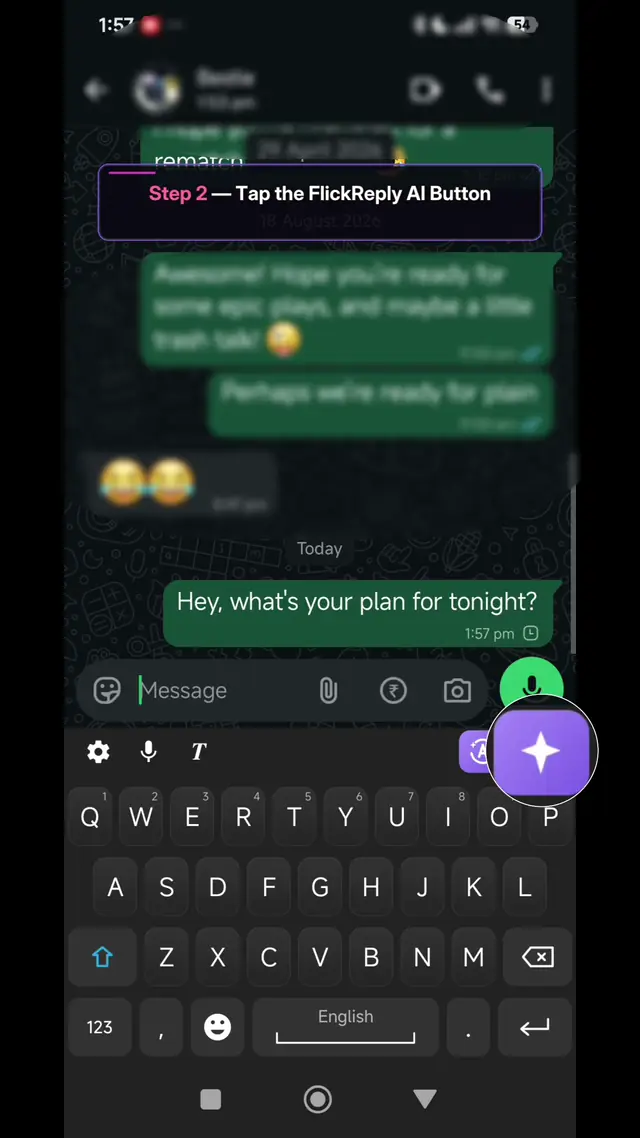
The AI reply assistant that reads the conversation
FlickReply's AI reply assistant is the feature the app is built around, available on Android and iOS. On Android, trigger it from the keyboard, pick a tone — professional, friendly, casual, funny or short — and it analyses the conversation shown on screen and suggests replies written in that tone; you never restate the context, because it can already see the thread. This screen-aware version works in WhatsApp, Instagram and LinkedIn, with Gmail in development, and is Android only. On iOS, the same tones and reply-writing run on the text you provide in the keyboard.
Most people already use AI to write replies. The workflow is almost always the same: leave the conversation, open a chatbot, paste in what you are replying to, read the answer, copy it, come back, paste it, fix the bits that do not sound like you. Roughly forty seconds and four app switches, by which point you have lost your place in the thread.
A screen recording of the FlickReply AI reply assistant: tapping the AI button in an Android chat, picking a reply tone, generating suggestions from the conversation already on screen and sending one.
Live previewNo account needed
Capabilities
What it does
Android: analyses the conversation already on screen
The keyboard is already in the chat, so it can read the thread you are replying to using Android’s Accessibility service, where enabled. You never describe the situation to it first — that step is the whole reason the chatbot round trip is slow. This screen-aware reading is Android only; iOS has no equivalent access to on-screen content outside the keyboard.
One tap, in the app you are already in
Nothing opens full screen and nothing steals your place in the thread. The draft appears in the keyboard area and goes into the field when you pick it.
You choose the tone before it writes
Professional, friendly, casual, funny or short is picked first, and the suggestions come back written that way — rather than generating something neutral and asking you to fix it afterwards.
Android: currently WhatsApp, Instagram and LinkedIn
Screen-aware reply drafting works from the conversation, so it needs support per app. Support for Gmail is in development with no announced date. Polishing and correcting a message you have written works everywhere already, on both Android and iOS.
What the suggestions actually look like
A real incoming message, the tone chosen before generating, and the suggestions returned.
In WhatsApp
They sent
Hey! Are we still on for Saturday? Also did you get a chance to look at the thing I sent over?
You pick: Friendly — before it writes anything
Suggested replies (friendly)
Yes, Saturday's still good! And sorry — I haven't looked at it properly yet, I'll get to it tonight.
Still on for Saturday as far as I know. I've had a quick look at what you sent but want to go through it properly before I reply.
Saturday works! Haven't had a proper look at the other thing yet, will come back to you on it.
Two questions in one message, and both are answered. This is the part that saves the time — you are editing, not remembering what you were asked.
In WhatsApp
They sent
Hi, I ordered 3 days ago and still haven't received any tracking. Order #4471.
You pick: Professional — before it writes anything
Suggested replies (professional)
Thanks for getting in touch, and apologies for the wait. Let me check order #4471 and get back to you with tracking within the hour.
Sorry about the delay on #4471. I'm looking into it now and will send tracking details as soon as I have them.
Apologies for the wait on order #4471 — checking on this now and will confirm tracking shortly.
The order number is carried through because the suggestion is built from the conversation on screen, not from a template.
In Instagram
They sent
loved your last post!! where'd you get that jacket??
You pick: Casual — before it writes anything
Suggested replies (casual)
Thank you! It's from a small place near me — I'll dig out the link and send it over.
Ah thanks! Got it locally, but I'll find the details for you.
Thanks! Let me find the link.
Casual keeps the register right. The same request set to professional returns something that would read very oddly in a DM.
When it will not help
Worth knowing before you install rather than after.
It only reads the conversation in WhatsApp, Instagram and LinkedIn
Reply drafting needs per-app support. Elsewhere the AI key will not produce a suggestion, though polish still works on anything you have typed.
It cannot know facts that are not in the thread
If the answer depends on something only you know — a date, a price, whether you actually want to go — the suggestion will guess or stay vague. Those are the replies you should write yourself.
Sending the first suggestion unedited is obvious
It will be slightly too tidy and carry nothing only you would say. One small edit in your own words is the difference, and it takes seconds.
How To Use It
How to use it
Android: open a chat in WhatsApp, Instagram or LinkedIn, tap the AI key, pick a tone, and FlickReply reads the conversation on screen to suggest replies in that tone.
iOS: type or select the text you want a reply written from, then tap the AI key and pick a tone.
Pick a suggestion, edit anything that does not sound like you, and send.
This part currently works in WhatsApp, Instagram and LinkedIn, because drafting from a conversation needs support per app. Correcting and rewriting a message you have already written works in every app today. See pricing for the allowances and the privacy policy for what happens to your text.
FAQ
AI reply assistant: common questions
An AI reply assistant proposes a reply for you, so you are editing something rather than starting from an empty field. With FlickReply you trigger it from the keyboard and pick a tone. On Android, it analyses the conversation shown on screen and suggests replies written in that tone, in WhatsApp, Instagram and LinkedIn — without you leaving the chat, restating the context or pasting anything into a chatbot. This screen-aware reading is Android only; on iOS, the reply assistant writes from the text you provide.
On Android, screen-aware reply drafting works in WhatsApp, Instagram and LinkedIn today, with support for Gmail in development. That mode needs per-app support because it works from the conversation rather than from a single message — unlike polish and correct, which works on text you have written and is available in every app, on both Android and iOS. On iOS, the reply assistant itself works from provided text, with no per-app restriction.
Not always on the first attempt, which is why you pick the tone before it writes rather than after. Suggestions generated as casual read very differently from the same request set to professional, and most people land on something that sounds like them by choosing the right tone and making one small edit. Sending the first suggestion untouched is what makes AI replies read as AI replies — in any keyboard, not just this one.
Yes, within WhatsApp, Instagram and LinkedIn — WhatsApp in particular is where a lot of small-business conversation happens. It drafts and re-tones one message at a time in the field you are typing in, so it suits replying and personalising rather than bulk sending. There is no template library, no mail merge and no scheduling, and none are planned.