One account, both devices
The same sign-in as the Android app. Your tone preference and your usage follow you between the phone and the laptop instead of starting over.
FlickReply for Chrome puts the reply assistant and the one-tap polish tool into every text box on your computer. Click into a field, pick a tone, and let it write the awkward part.
What Is In The Panel
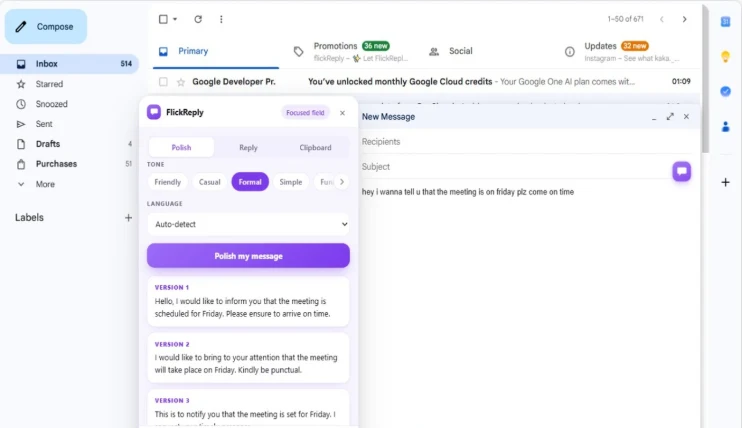
The panel opens beside whatever field you clicked into. Pick the tab for the job, choose a tone, and it works on the text in front of you.
Write the message badly, press Polish, and choose from several corrected versions. Spelling, grammar and tone in one pass.
Getting Started
One click from the Chrome Web Store. No download, no installer, no restart.
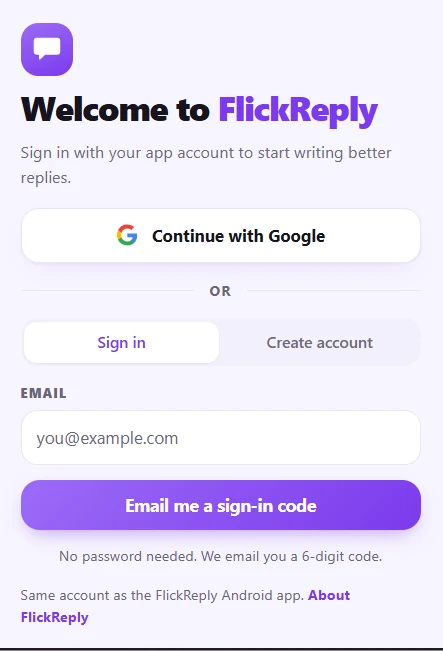
Continue with Google, or enter your email and paste the six-digit code it sends. No password to invent.
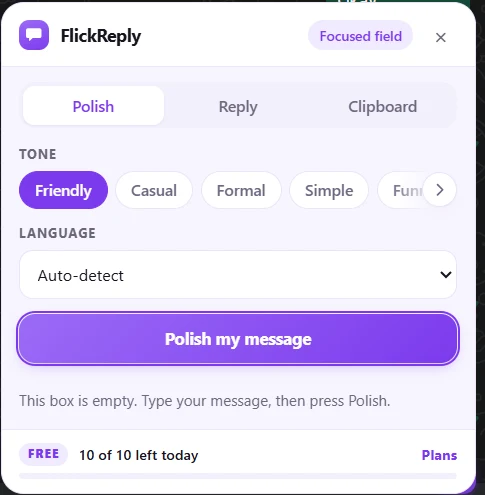
The panel attaches to the focused field and shows a badge naming it, so you can see what it is pointed at.
Pick a tone, then let it rewrite what you wrote or draft an answer to what is already on screen.
One Account
Sign in with Google or a six-digit email code. Your tone, your language and your remaining requests are the same on both.
Worth Knowing First
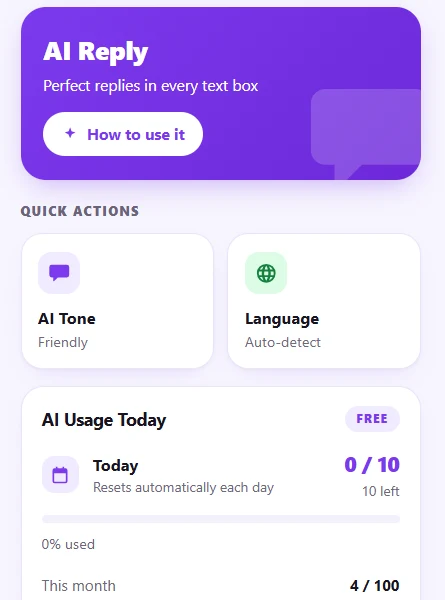
The same sign-in as the Android app. Your tone preference and your usage follow you between the phone and the laptop instead of starting over.
Free gives you 10 AI requests a day and 100 a month. That pool is shared, not doubled: a reply drafted in Chrome spends the same quota as one drafted on your phone.
It works off whichever box has your cursor rather than integrating with named websites, which is why there is no list of supported sites. Reply needs a conversation on screen to read; Polish only needs your own draft.
A browser has no input method to replace, so the layout, emoji panel and resize modes from the Android app have no meaning here. What crosses over is the AI and the clipboard.
FlickReply for Chrome puts the AI reply assistant and the message polish tool into text boxes on your computer. A browser has no input method, so it is not a keyboard the way the Android app is: it is an extension that attaches to whatever field you are typing in, and opens a panel with Polish, Reply and Clipboard tabs beside it.
No. The extension works on its own and you can install it without ever having used the Android keyboard. If you do have both, they share one account and one usage allowance, so what you draft on your laptop counts against the same daily total as what you draft on your phone.
Yes, one account across both. Sign in with Google, or enter your email and the extension sends a six-digit code, so there is no password to create or remember. Your tone preference and usage carry across.
Any text box in the browser, which is the point of attaching to the focused field rather than integrating with named sites. It is used most in webmail and web messengers, and the listing screenshot shows it inside Gmail. Reply drafting needs a conversation visible on screen to read; Polish only needs the text you wrote.
Yes, on the same free allowance as the app: 10 AI requests a day and 100 a month, shared between the extension and the Android keyboard rather than counted separately. Premium raises the limits for both at once.
It reads the field you have focused when you ask it to do something, and the conversation on screen when you press Reply. The panel shows a "Focused field" badge so you can see which box it is pointed at. Nothing is sent for processing until you press Polish or Reply, and what it sends is covered by the same privacy policy as the app.
It is published on the Chrome Web Store, so it installs in Chrome and in Chromium-based browsers that accept Chrome extensions, such as Edge, Brave and Opera. There is no Firefox or Safari build.
No, and it could not. The keyboard layout, emoji panel, resize, one-handed mode and floating keyboard exist because the Android app is an input method that draws its own keyboard. In a browser you type with your own physical keyboard, so what carries over is the AI: Polish, Reply and clipboard history.
Free to install, 10 AI requests a day, and the same account as the Android keyboard. Already using it on your phone? Signing in is the only setup left.
On Android the reply assistant also reads the conversation in WhatsApp, Instagram and LinkedIn. Compare the plans or read what it can see.